Nepali Typing Tool - Easy Romanized to Devanagari Converter
Free online English to Nepali typing tool with smart autocomplete. Type in Roman characters and get instant Devanagari output!
Type Here (Roman/English):
Nepali Output (Devanagari):
- Start typing and see instant conversion!
- Press Tab to accept autocomplete suggestions
- Use / to separate words: pratishat/ko → प्रतिशतको
- Use \ for halant: bas\ → बस्
- Capital letters for retroflex: Ta → ट, ta → त
Common Examples:
| Type This | Get This |
|---|---|
namaste |
नमस्ते |
dhanyabad |
धन्यबाद |
naam |
नाम |
hajurlai |
हजुरलाई |
kasto chha |
कस्तो छ |
What is Romanized Nepali Typing?
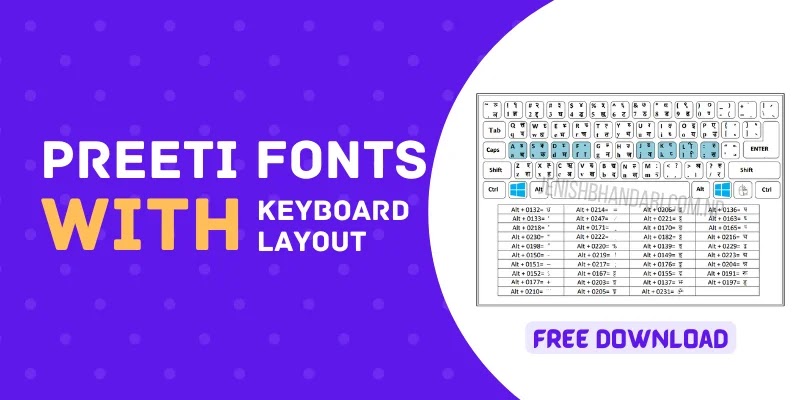
Romanized Nepali typing is a method where you type Nepali words using English (Roman) letters, and they automatically convert to Devanagari script. This easy Nepali typing method is perfect for people who don't have a Nepali keyboard or don't know the traditional Nepali keyboard layout.
Our English to Nepali typing tool uses phonetic transliteration, which means you type exactly how words sound. For example, type "namaste" and instantly get "नमस्ते". It's that simple!
How to Use This Nepali Typing Tool
- Type in Roman letters - Just type Nepali words using English keyboard (example: type "dhanyabad")
- See instant conversion - The Devanagari output appears automatically (you'll see "धन्यबाद")
- Use autocomplete - When suggestions appear, press Tab to quickly complete words
- Copy your text - Select and copy the Nepali text to use anywhere
Key Features of Our Romanized Nepali Typing Tool
- Real-time conversion - Instant translation as you type
- Smart autocomplete - Over 200+ common Nepali words with suggestions
- Advanced controls - Word separator (/), halant control (\), capital letter distinctions
- Special characters - Support for anusvara (*), chandrabindu (**), Om, and conjunct consonants
- 100% free - No registration, no downloads, works on all devices
- Mobile friendly - Type Nepali on your phone, tablet, or computer
Romanized Nepali Typing Rules & Patterns
Basic Vowels
Type these Roman letters to get Nepali vowels:
- a → अ
- aa → आ
- i → इ
- ii → ई
- u → उ
- uu → ऊ
- e → ए
- ai → ऐ
- o → ओ
- au → औ
Common Consonants
Basic Nepali typing consonants:
- ka → क
- ga → ग
- cha → च
- ja → ज
- ta → त
- da → द
- na → न
- pa → प
- ba → ब
- ma → म
- ya → य
- ra → र
- la → ल
- wa/va → व
- sa → स
- ha → ह
Capital Letters - Retroflex vs Dental
This is an important feature for accurate romanized Nepali typing:
- ta → त (dental t)
- Ta → ट (retroflex T)
- tha → थ (dental th)
- Tha → ठ (retroflex Th)
- da → द (dental d)
- Da → ड (retroflex D)
- dha → ध (dental dh)
- Dha → ढ (retroflex Dh)
- na → न (dental n)
- Na → ण (retroflex N)
- sha → श (palatal sha)
- Sha → ष (retroflex Sha)
Special Characters & Symbols
- ksha → क्ष (conjunct consonant)
- tra → त्र (conjunct consonant)
- gya → ज्ञ (conjunct consonant)
- chha → छ
- yna → ञ
- * → ं (anusvara)
- ** → ँ (chandrabindu)
- om → ॐ
- rri → ऋ
- rree → ॠ
Advanced Controls
Word Separator (/): Use forward slash to separate words that are being wrongly joined.
Example: pratishatko gives wrong result, but pratishat/ko gives correct प्रतिशतको
Halant Control (\): Use backslash to force a halant (virama) at the end.
Example: bas → बस, but bas\ → बस्
Common Nepali Words for Practice
| English Meaning | Type This | Get This |
|---|---|---|
| Hello/Greetings | namaste |
नमस्ते |
| Thank you | dhanyabad |
धन्यबाद |
| You (formal) | tapai |
तपाई |
| To you (formal) | tapaailai |
तपाईलाई |
| Sir/Madam | hajur |
हजुर |
| To sir/madam | hajurlai |
हजुरलाई |
| Name | naam |
नाम |
| Good | ramro |
राम्रो |
| How is it? | kasto chha |
कस्तो छ |
| Okay/Fine | thik |
ठिक |
| Nepal | nepal |
नेपाल |
| I/Me | ma |
म |
| To me | malai |
मलाई |
| My/Mine | mero |
मेरो |
Why Use Our English to Nepali Typing Tool?
1. No Nepali Keyboard Required
You don't need to buy or install a Nepali keyboard. Our romanized Nepali typing tool works with your regular English keyboard, making it accessible to everyone.
2. Easy to Learn
Unlike traditional Nepali keyboard layouts that require memorization, our phonetic system is intuitive. You just type how words sound in English, making it the easiest way for easy Nepali typing.
3. Works Everywhere
Use this tool on any device - desktop computer, laptop, tablet, or smartphone. No downloads or installations needed. Just open your browser and start typing!
4. Smart Autocomplete
Our tool includes 200+ common Nepali words with smart suggestions. As you type, you'll see suggestions that you can quickly accept with the Tab key, making typing faster and helping you learn correct spellings.
5. Advanced Features for Accuracy
With features like word separator (/), halant control (\), and capital letter distinctions for retroflex consonants, you can type complex Nepali text with complete accuracy.
6. Perfect for All Users
Whether you're a student, professional, content creator, or just someone who wants to communicate in Nepali, this tool is designed for everyone. From simple messages to professional documents, our Nepali typing tool handles it all.
Use Cases for Romanized Nepali Typing
Social Media
Post status updates, write comments, and send messages in Nepali on Facebook, Instagram, Twitter, and other social platforms. Express yourself in your native language!
Email & Professional Communication
Write professional emails, reports, and documents in Nepali. Our tool ensures proper Devanagari script that looks professional and is easy to read.
Academic Work
Students can use this English to Nepali typing tool for essays, assignments, research papers, and projects in Nepali language.
Content Creation
Bloggers, writers, and content creators can write articles, stories, poems, and other creative content in beautiful Nepali Devanagari script.
Chat & Messaging
Chat with friends and family in Nepali on WhatsApp, Viber, Messenger, and other messaging apps. Share your thoughts in your mother tongue!
Government & Official Documents
Fill forms, create applications, and prepare official documents in proper Nepali script using our accurate transliteration system.
Tips for Efficient Nepali Typing
1. Start with Common Words
Begin by practicing common greetings and everyday words like "namaste", "dhanyabad", "tapai", "ramro". This will help you get comfortable with the system.
2. Learn Capital Letter Rules
Understanding when to use capital letters (Ta vs ta, Na vs na) is crucial for accurate romanized Nepali typing. Practice these distinctions early.
3. Use Autocomplete
Don't ignore the autocomplete suggestions! They save time and help you learn correct spellings. Press Tab to quickly accept suggestions.
4. Practice Word Separation
When you encounter compound words that aren't converting correctly, remember to use the forward slash (/) to separate them.
5. Master Special Characters
Learn the codes for special characters like anusvara (*), chandrabindu (**), and conjunct consonants (ksha, gya, tra). These are commonly used in Nepali.
Frequently Asked Questions (FAQ)
Q: Is this Nepali typing tool completely free?
A: Yes! Our romanized Nepali typing tool is 100% free with no hidden costs, no registration required, and no downloads needed. Use it as much as you want!
Q: Do I need to install anything?
A: No installation required. This is a web-based tool that works directly in your browser. Just visit this page and start typing!
Q: Can I use this on my mobile phone?
A: Absolutely! Our tool works on all devices including smartphones and tablets. You can do easy Nepali typing on any device with a web browser.
Q: How accurate is the conversion?
A: Our English to Nepali typing tool is highly accurate and supports all Nepali characters, conjunct consonants, and special symbols. It follows standard ITRANS transliteration rules.
Q: Can I copy the Nepali text to use elsewhere?
A: Yes! Simply select the Nepali text from the output box, copy it (Ctrl+C or Cmd+C), and paste it anywhere - Word documents, emails, social media, messaging apps, etc.
Q: What's the difference between ta and Ta?
A: Lowercase 'ta' produces the dental consonant त, while capital 'Ta' produces the retroflex consonant ट. This same pattern applies to other consonants like tha/Tha, da/Da, na/Na, and sha/Sha.
Q: How do I type special symbols like anusvara?
A: Type an asterisk (*) for anusvara (ं), double asterisk (**) for chandrabindu (ँ), and 'om' for the Om symbol (ॐ).
Q: What if words are being joined incorrectly?
A: Use the forward slash (/) as a word separator. For example, if "pratishatko" gives wrong output, type "pratishat/ko" to get the correct प्रतिशतको.
Q: Can I use this for professional documents?
A: Yes! Our tool produces accurate, professional-quality Devanagari script suitable for all purposes including business documents, academic papers, government forms, and official communication.
Q: Is my data private and secure?
A: Yes, completely! Everything you type is converted directly in your browser. We don't store, track, or transmit any of your text to any server. Your privacy is 100% protected.
Learn Nepali Script with Our Tool
Our romanized Nepali typing tool is not just a converter - it's also a learning tool! As you type, you'll gradually learn how Nepali words are spelled in Devanagari script. The autocomplete suggestions show you the correct Nepali spelling alongside the Roman transliteration, helping you improve your Nepali writing skills over time.
Conclusion
Whether you're learning Nepali, communicating with family and friends, or creating professional content, our free English to Nepali typing tool makes writing in Devanagari script simple and accessible. With features like real-time conversion, smart autocomplete, and advanced controls, you have everything you need for accurate Nepali typing.
Start typing now and experience how easy romanized Nepali typing can be. No registration, no downloads, no complications - just pure, simple, efficient Nepali typing at your fingertips!
Ready to Start?
Scroll back up to the tool and start typing! Try common phrases like "namaste", "dhanyabad", or "mero naam" to see how easy it is. Remember to use the autocomplete feature by pressing Tab when suggestions appear. Happy typing! 🇳🇵

 Learn more about IELTS in Nepal